What Is an Uncensored AI Generator? Privacy, Control, and Best Options
Learn what an uncensored AI generator is, how it differs from mainstream filtered tools, privacy and legal basics, and how to evaluate options.

An uncensored AI generator is an image-generation tool or setup that minimizes automated blocks on lawful but sensitive prompts—think adult or erotic themes, fetish aesthetics, or edgy styles—giving creators more room to explore than mainstream, heavily filtered services. Crucially, “uncensored” does not mean “anything goes.” Universal red lines still apply (for example, no minors or age‑ambiguous depictions, no non‑consensual content, and adherence to local obscenity and hosting laws). In short, an uncensored AI generator aims to expand creative freedom while keeping legal and ethical guardrails intact.
This guide explains how these systems differ from mainstream filtered tools, what’s safe and legal at a high level, how privacy choices change your risk, and what to look for when you evaluate your options. If you’ve searched for an uncensored AI generator because mainstream tools say “no” to your otherwise lawful concepts, you’re in the right place.
What “uncensored” means (and what it doesn’t)
When people say “uncensored” in the AI art world, they usually mean:
Fewer automated content filters for lawful adult or sensitive material
More fine‑grained control over prompts and edits (e.g., inpainting, negative prompts, LoRA)
Clear responsibility placed on the user to follow the law and community norms
“Uncensored” does not mean:
Permission to generate illegal or exploitative content
Absence of guardrails (reputable tools still set bright‑line boundaries)
Guaranteed privacy—policies and data practices still vary by tool
Who an uncensored AI generator is for
Adult and NSFW creators who want lawful expressive freedom beyond PG filters will feel at home, as will hobbyists and professionals who need character consistency and precise, iterative editing. It also suits privacy‑conscious users who prefer local or privacy‑first workflows to minimize data exhaust and platform logging.
The censorship spectrum: mainstream filters to local control
Think of content filtering like a camera with built‑in ND filters. Some cameras won’t let you remove the filter; others let you slide it off when the scene calls for it. Uncensored options lean toward user‑removable filters under legal guardrails.
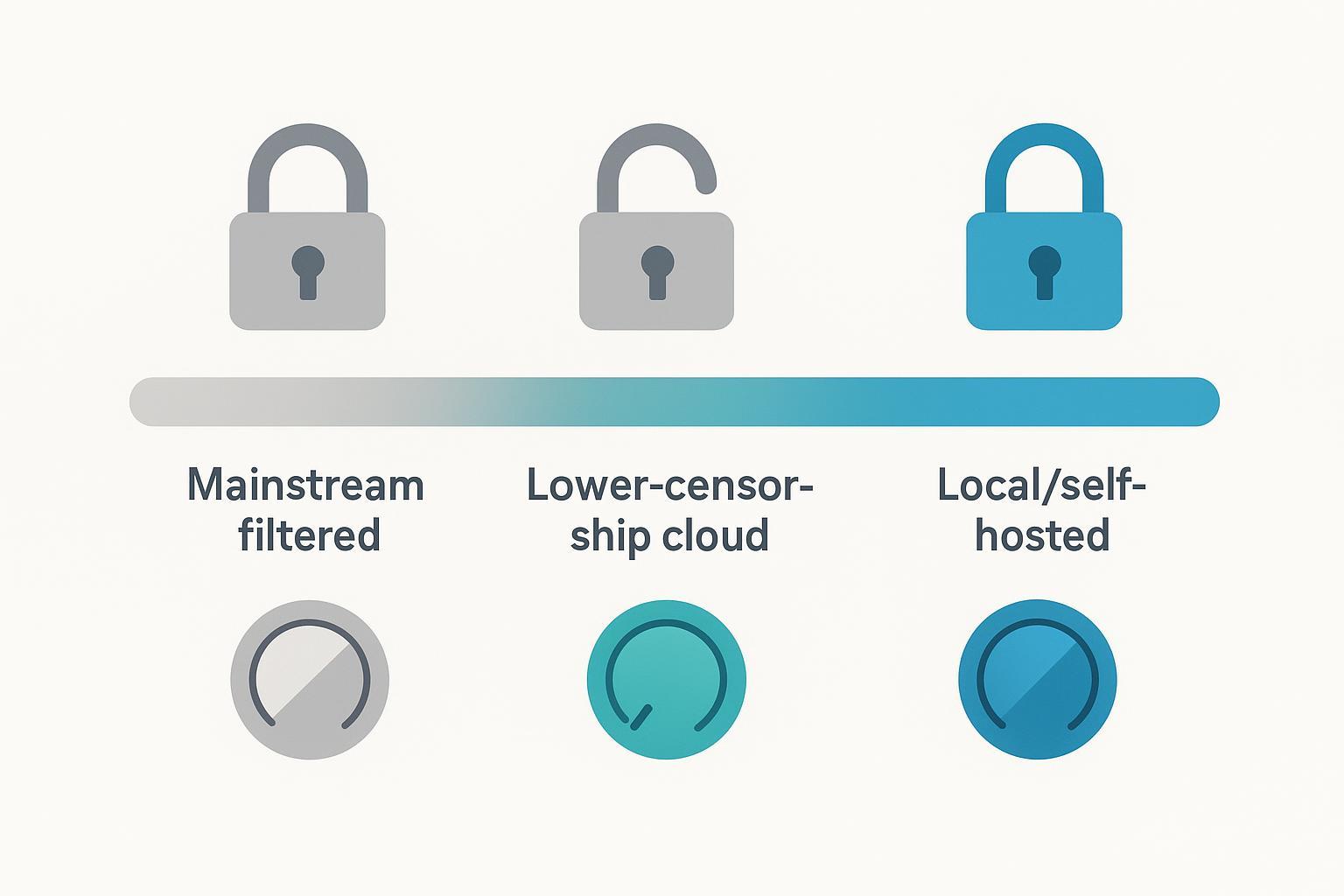
Mainstream filtered (strict): Centrally hosted platforms enforce heavy blocks on sexual or explicit content. For example, OpenAI’s Usage Policies prohibit graphic sexual content and image tools enforce strict filters for sexual/adult themes (updated 2026‑03‑15); see the policy under Usage Policies at OpenAI’s site: OpenAI Usage Policies. Midjourney’s Community Guidelines state “No adult content or gore” (Guidelines dated 2026‑02‑12): Midjourney Community Guidelines. Adobe’s Generative AI User Guidelines prohibit pornographic material or explicit nudity (updated 2026‑03‑13): Adobe Generative AI User Guidelines.
Lower‑censorship cloud (guardrails remain): Some hosted platforms allow lawful adult content within clear boundaries (e.g., zero tolerance for sexualized minors, exploitation, or non‑consensual content). Stability AI’s Acceptable Use Policy, effective 2025‑07‑31, outlines permitted and prohibited uses while employing safety filters on hosted services: Stability AI Acceptable Use Policy.
Local/self‑hosted (user‑controlled): Running Stable Diffusion variants on your own machine (e.g., via common UIs) lets you tune or remove automatic NSFW filters, within the limits of the law. Here, you accept greater responsibility for compliance, privacy hygiene, and storage practices.
Is it safe and legal? A quick primer
This overview is informational and not legal advice. Always consult an attorney for your situation and follow local laws.
Absolute red lines: Never include minors or age‑ambiguous depictions; never create non‑consensual or exploitative content; avoid defamation and illicit deepfakes. U.S. federal definitions of “minor” and “sexually explicit conduct” are set out in 18 U.S.C. § 2256, and related prohibitions appear in §§ 2251, 2252, and 1466A. See the U.S. Legal Information Institute summaries for statutory language: 18 U.S.C. § 2256 definitions; 18 U.S.C. § 2252; 18 U.S.C. § 2251; 18 U.S.C. § 1466A.
Likeness, consent, and publishing: Secure consent when using a person’s likeness. Check right‑of‑publicity and defamation laws where you publish or host. If you distribute certain adult works, be aware of record‑keeping obligations (see 18 U.S.C. § 2257 and § 2257A for U.S. contexts).
Local obscenity/hosting rules: Standards vary by jurisdiction. What is lawful to create or possess may still be risky to host or sell online depending on platform rules and local law.
Privacy choices that actually matter
Your privacy posture changes with where and how you create.
Local vs. cloud: Local/self‑hosted generation keeps prompts and images on your machine, avoiding provider‑side logging by default. Cloud tools may retain prompts, generated images, and telemetry depending on their privacy policies and terms. Review each vendor’s privacy documentation and any data‑use‑for‑training disclosures.
Metadata hygiene (EXIF/IPTC/XMP): EXIF may store device, time, and GPS data; IPTC/XMP can carry descriptive and rights info. For sensitive work, strip metadata before sharing. A common command‑line approach is ExifTool:
exiftool -all= image.jpg(creates a backup by default). See IPTC references: IPTC Photo Metadata Standard and the 2025.1 update: IPTC 2025.1 AI properties.Provenance and Content Credentials (C2PA): Content Credentials cryptographically record creation and edit history. They improve transparency and trust but are not a privacy tool. Learn more in the C2PA explainer: C2PA Explainer (spec 2.3).
How creators gain control: prompts, seeds, and edits
Here’s the deal: the appeal of an uncensored AI generator isn’t just fewer blocks—it’s better control over what you make.
Negative prompts: Tell the model what to avoid to reduce artifacts (e.g., “blurry, bad anatomy, extra fingers”). Stability’s prompt guide offers foundations for SD3.x workflows: Stable Diffusion prompt guide.
Seed control: Fix a seed number to reproduce similar starting noise; it’s essential for repeatability.
CFG scale: Controls prompt adherence versus creativity. Beginners often start around 4–8; higher values can force fidelity but risk harsh artifacts.
Inpainting/outpainting: Mask to repair small defects or extend the canvas while maintaining style. See Diffusers docs: Inpainting basics and Outpainting.
LoRA and embeddings: Apply style or character traits at inference with lightweight adapters. Overviews: LoRA on Hugging Face and Diffusers LoRA training.
Three beginner‑friendly prompt templates (safe language; adapt to your context):
Style pose study
Prompt: “portrait study, soft window light, 85mm look, elegant pose, detailed skin, cinematic tone”
Negative: “blurry, low contrast, overexposed, bad hands”
Settings: seed fixed; CFG 6–7; 20–30 steps
Fabric and form
Prompt: “studio scene, silk fabric drape, tasteful silhouette, rim light, balanced composition”
Negative: “blurry, bad anatomy, harsh shadows, color banding”
Settings: seed fixed; CFG 5–6; 22–28 steps
Consistency shot (use LoRA or reference image)
Prompt: “consistent character portrait, three‑quarter view, soft key light, matched palette, crisp details”
Negative: “double face, extra limbs, mismatched colors”
Settings: seed reused; CFG 6; inpaint for fixes
How to choose an uncensored option (evaluation checklist)
Below is a compact checklist you can apply to any platform or local setup.
Criterion | What to look for | Why it matters |
|---|---|---|
Policy transparency | Clear allowed/prohibited list, with dates and links to official docs | Sets bright lines; reduces surprise blocks |
Privacy posture | Data retention, telemetry, training use of your prompts/images; local/on‑device options | Minimizes data exhaust and exposure |
Control toolset | Negative prompts, seeds, in/outpainting, LoRA/embeddings, reference images | Enables precise edits and consistency |
Model/library support | SDXL/SD3 variants, ControlNet/adapters, LoRA stacking | Broadens creative range and reuse |
NSFW granularity | Toggles/categories that allow lawful adult work while blocking illegal/exploitative content | Balances freedom with safety |
Export controls | Strip metadata on export; optional Content Credentials | Manages privacy or provenance needs |
A practical, privacy‑first micro‑workflow (example)
Below is a generic, tool‑agnostic workflow you can follow on a privacy‑first platform or a local setup. For example, a privacy‑first, uncensored‑friendly platform like DeepSpicy can be used in a similar way without making comparative claims.
Draft and seed
Write a clear prompt describing composition, lighting, and mood. Add a short negative prompt (e.g., “blurry, bad hands”). Fix a seed for repeatability.
Generate and select
Create 4–8 variants. Pick the closest. Adjust CFG between ~5–8 to balance fidelity and aesthetics.
Inpaint for precision
Mask and repair small defects (hands, fabric edges). Keep the same seed where possible to maintain cohesion.
Ensure consistency
Load an appropriate LoRA or use a reference‑image feature for character consistency; reuse seed and palette cues.
Privacy or provenance on export
Decide between transparency and privacy. Either attach Content Credentials (C2PA) to document provenance, or strip EXIF/IPTC using ExifTool before sharing.
Next steps and resources
For more prompt ideas and starter settings, see the internal primer: 24 Privacy‑First Uncensored AI Image Generator Prompts.
If mainstream filters are blocking your lawful art, consider testing a local/self‑hosted setup or a privacy‑first platform with clear policy pages and transparent data practices. Start small, keep a fixed seed, and practice safe metadata hygiene.
Acknowledgments and sources (selected, 2025–2026): OpenAI Usage Policies (updated 2026‑03‑15); Midjourney Community Guidelines (2026‑02‑12); Adobe Generative AI User Guidelines (2026‑03‑13); Stability AI Acceptable Use Policy (effective 2025‑07‑31); IPTC Photo Metadata Standard (2025.1); C2PA Explainer; Hugging Face Diffusers and LoRA resources; Stability AI prompt guide. Where linked above, each title points to the primary, dated source.